IMAGE RESIZER / PIXEL-ALIGNED CROPPING
Where does the extra pixel go in a center crop?
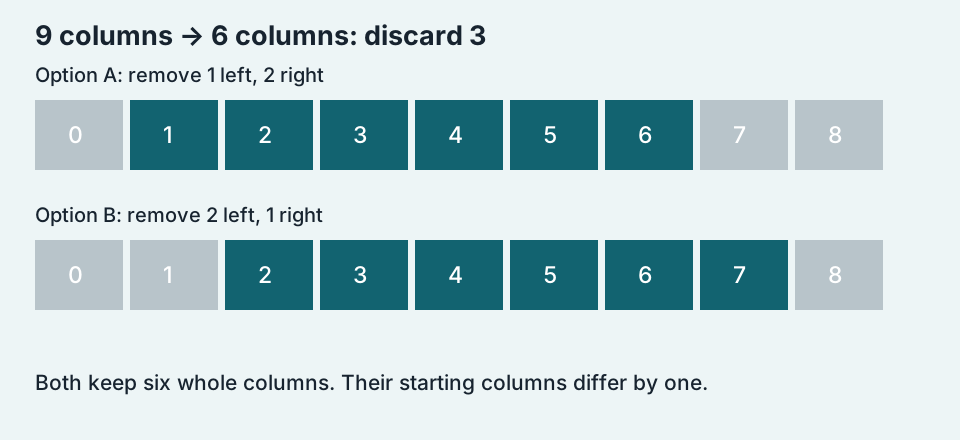
When a pixel-aligned crop removes an odd number of columns, equal whole-pixel cuts on both sides are impossible. Cropping 9 columns down to 6 removes 3: either 1 left and 2 right, or 2 left and 1 right. Both outputs are 6 columns wide, but their content differs by one source column.
See the downloadable pixel test ↓Centering the frame is not centering the subject
A geometric center crop uses the image boundaries. It does not detect a face or a product. This guide isolates integer-aligned crop placement without resizing or interpolation. An editor that uses fractional coordinates and resamples pixels is performing a different operation, so its output need not match either integer choice below.
A 9 × 6 input with two 6 × 6 outputs
We made a tiny RGB test image whose colors encode its source coordinates. Its columns are numbered 0 through 8 and rows 0 through 5. For the first output we kept columns 1 through 6. For the second we kept columns 2 through 7. Both kept every row. Each output therefore contains exactly 36 pixels, with no pixel blending.
Download the exact PNG files: 9 × 6 source, 6 × 6 starting at column 1, and 6 × 6 starting at column 2. They are deliberately tiny diagnostic images, not photographs. View them with a nearest-neighbor pixel zoom if you want to inspect the cells.


We decoded both saved outputs and compared each pixel with its specified source coordinate. All 36 pixels in each output matched the intended source region. Comparing the two outputs at the same output coordinates, all 36 pixels differed because the source pattern changes at every column. That result establishes the placement difference in this test; it does not mean every photograph would have 36 visibly different pixels.
The rule we used, written explicitly
Let W be the source width and C the smaller crop width. The number of discarded columns is D = W − C. Our first choice removes L = floor(D ÷ 2) columns on the left and R = D − L on the right. If D is odd, the right side loses one more column. The alternative starts one column later, reversing that imbalance. Neither rule is asserted to be the rule of every image editor.
For the 9-to-6 example, D = 3 and L = 1. The crop occupies the boundary interval [1, 7), whose center is 4. The source occupies [0, 9), whose center is 4.5. The crop frame is therefore half a source pixel to the left. The alternative [2, 8) has center 5, half a pixel to the right. The two frame centers are one full source pixel apart, although each is only half a pixel from the ideal center.
Six worked horizontal cases
The table applies the same floor-left rule to every row. Center shift is the crop-frame center minus the source-frame center, measured in source pixels. Negative means left. These are calculated placements, not measurements of any online cropper.
| Source W | Crop C | Removed D | Left L | Right R | Center shift |
|---|---|---|---|---|---|
| 9 | 6 | 3 | 1 | 2 | -0.5 |
| 10 | 6 | 4 | 2 | 2 | 0 |
| 11 | 6 | 5 | 2 | 3 | -0.5 |
| 1,201 | 800 | 401 | 200 | 201 | -0.5 |
| 1,200 | 800 | 400 | 200 | 200 | 0 |
| 4,033 | 3,024 | 1,009 | 504 | 505 | -0.5 |
The 1,201-to-800 case removes 401 columns: 200 left and 201 right. Its frame shift is −0.5. The 1,200-to-800 case removes 400: 200 on each side, so its shift is zero. It is the parity of the discarded amount that decides this tie, not whether the output width alone is odd or even.
Check your own pair of widths
Enter the source width and the crop width. This calculator reports our integer floor-left placement and its center shift. It does not process a photo or predict another tool’s default.
What about top and bottom?
Apply the same calculation to source height and crop height. An odd number of removed rows creates the corresponding top-or-bottom choice. For a square crop, use the intended square side as the crop dimension on each axis; an axis that already matches needs no removal.
Should I move the crop by one pixel?
If a border, grid line or repeated sprite must align exactly, choose and record the retained source coordinates. Moving by one pixel switches between the two integer choices in an odd-removal case. If you need perfect fractional geometric centering instead, check whether the editor resamples, because blending pixels changes the test you are performing.
Specify the retained region, not just the final size. Two files can have identical dimensions while preserving different edge columns. A reproducible crop records where it starts as well as how many pixels it keeps.
Return to the image resizer →