IMAGE RESIZER · A PRACTICAL ANSWER
Why does an image resizer change the height by one pixel?
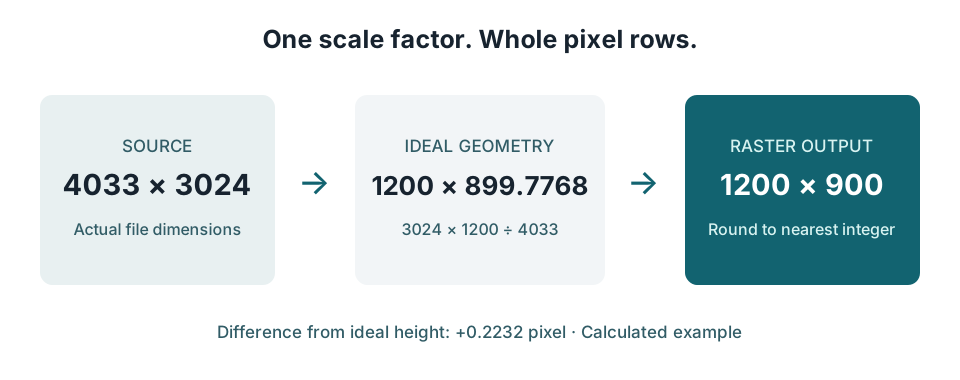
An image needs whole-number pixel dimensions. If proportional resizing produces a fractional height, the resizer must round it. For a 4033 × 3024 image resized to 1200 pixels wide, the proportional height is 899.7768 pixels; rounding to the nearest whole pixel gives 1200 × 900. A one-pixel difference can be ordinary rounding, rather than a broken aspect-ratio lock.
Check your own dimensions ↓A worked example you can verify
Start with the original width, not the width displayed inside a web page. Divide your target width by that original width to get a scale factor. Here the factor is 1200 ÷ 4033. Multiply the original height by the same factor: 3024 × 1200 ÷ 4033 = 899.7768410612. A raster image cannot contain 0.7768 of a row, so our nearest-integer rule outputs 900 rows.
The difference between the ideal and rounded height is 900 − 899.7768410612 = 0.2231589388 pixel. That is less than half a pixel. The output ratio is 1200 ÷ 900, while the source ratio is 4033 ÷ 3024. They differ slightly because the two output dimensions must both be integers. Do not repeatedly adjust the height between 899 and 900: neither one reproduces a fractional row exactly.
Six exact inputs, one rounding rule
These are calculated examples, not claimed results from another image resizer. Every row uses the same rule: exact height = original height × target width ÷ original width; output height = floor(exact height + 0.5). The last column is output height minus exact height. Values shown to four decimal places are rounded for display; the calculation uses the unrounded value.
| Original pixels | Target width | Exact height | Output height | Delta, pixels |
|---|---|---|---|---|
| 4033 × 3024 | 1200 | 899.7768 | 900 | +0.2232 |
| 4033 × 3024 | 800 | 599.8512 | 600 | +0.1488 |
| 4033 × 3024 | 640 | 479.8810 | 480 | +0.1190 |
| 1921 × 1080 | 1000 | 562.2072 | 562 | -0.2072 |
| 3001 × 2000 | 900 | 599.8001 | 600 | +0.1999 |
| 1001 × 1000 | 500 | 499.5005 | 500 | +0.4995 |
Notice that an original image only one pixel wider than a familiar ratio can change the calculation. For 1921 × 1080 resized to width 1000, the ideal height is 562.2072; nearest rounding gives 562. Replacing 1921 with 1920 before calculating would give 562.5 and round to 563. Always use the actual file dimensions instead of assuming that an image is exactly 16:9.
Check whether your height is just rounding
Enter the dimensions of the file you started with, the requested output width, and the output height you actually received. This checker compares your height with the nearest-integer rule above. It does not inspect your file, identify another tool’s algorithm, or judge visual sharpness. Nothing is uploaded.
Our checker treats an exact half-pixel tie by rounding upward, so 562.5 becomes 563. An editor that rounds ties to an even integer or rounds downward can choose a different row count at that boundary. A mismatch with this checker alone is not proof that the editor stretched your image. The rule is explicit here so that you can reproduce the calculation.
When both dimensions must preserve the ratio exactly
Whole-pixel dimensions can preserve an exact ratio when both output dimensions are integer multiples of the original ratio reduced to its smallest terms. The greatest common divisor of 4033 and 3024 is 1, so that ratio is already reduced. Its positive exact integer pairs are 4033 × 3024, 8066 × 6048, and further whole multiples. There is no smaller positive integer pair with precisely that ratio. Width 1200 therefore requires a tiny rounding difference, a crop, or added padding.
For comparison, 4000 × 3000 reduces to 4:3. Output pairs such as 1200 × 900 and 800 × 600 can preserve that ratio exactly because both sides are whole multiples of 4 and 3. This is a geometric property of the source dimensions, not a promise that detail or file bytes will be preserved.
What should I do about a one-pixel difference?
If the destination accepts flexible dimensions, use the rounded output and inspect it at the size it will actually be displayed. If an upload form requires an exact width and height, meet that pair deliberately. Cropping removes a strip of content; padding adds a border. Unlocking the ratio forces the picture into the pair and may distort it. Choose between those changes instead of trying to store a fractional pixel row.
Does this explain a large size mismatch?
No. This example addresses the small integer-dimension difference caused by rounding. A substantially different aspect ratio calls for a separate check of crop settings, orientation, and the actual dimensions read from the file. A difference in kilobytes is a different measurement and is not diagnosed by this calculator.
Does a one-pixel change make the picture blurry?
The integer count alone cannot tell you. Blur depends on the content, scale, sampling and encoding. First separate the geometry question from the appearance question: confirm the output dimensions, then judge the image at its intended display size.