IMAGE RESIZER / EXACT BYTE LIMITS
Your image says 200 KB. Why is it still too large?
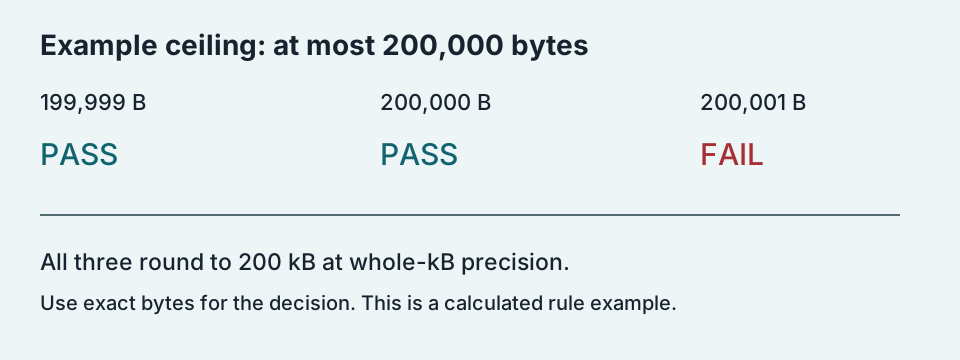
A rounded “200 KB” label is not an exact byte count. A file of 200,001 bytes can display as 200 kB when rounded, yet exceed a 200,000-byte limit. Another limit may mean 200 KiB, or 204,800 bytes. Check the saved file’s exact bytes and the form’s actual rule before resizing again.
Compare the boundary cases ↓Two meanings that a short label can hide
A decimal kilobyte, written kB, is 1,000 bytes. A kibibyte, written KiB, is 1,024 bytes. A label written only as “KB” does not tell you which convention a particular application implemented. This page compares explicit byte limits; it does not infer a portal’s implementation from its wording.
Build the limit before checking the file
For our decimal example, multiply 200 by 1,000: the ceiling is 200,000 bytes. For our binary example, multiply 200 by 1,024: the ceiling is 204,800 bytes. Their difference is 4,800 bytes. Every integer byte count from 200,001 through 204,800 passes the inclusive binary example but fails the inclusive decimal example. That interval contains 204,800 − 200,001 + 1 = 4,800 different byte counts.
These are arithmetic examples, not tests against a real application form. We use “inclusive” to mean the file is accepted at exactly the stated ceiling. A form requiring strictly less than the ceiling is different: a 200,000-byte file passes “at most 200,000” but fails “less than 200,000.” The wording and implementation need to agree before an exact-boundary result can be predicted.
Six file sizes, with the rule held explicit
We evaluated these six integer inputs against two example checks: bytes ≤ 200,000 and bytes ≤ 204,800. Conversion values are shown to three decimal places for kB and six for KiB. Pass or fail is calculated from the original integer, never from a rounded conversion.
| Exact bytes | Decimal kB | Binary KiB | ≤ 200,000 B | ≤ 204,800 B |
|---|---|---|---|---|
| 199,999 | 199.999 | 195.311523 | Pass | Pass |
| 200,000 | 200.000 | 195.312500 | Pass | Pass |
| 200,001 | 200.001 | 195.313477 | Fail | Pass |
| 204,799 | 204.799 | 199.999023 | Fail | Pass |
| 204,800 | 204.800 | 200.000000 | Fail | Pass |
| 204,801 | 204.801 | 200.000977 | Fail | Fail |
The pair 200,000 and 200,001 isolates a one-byte failure at the decimal ceiling. Both become “200 kB” if we round their decimal values to the nearest whole kB, but only the first passes that inclusive check. The pair 204,800 and 204,801 does the same at the binary ceiling. A rounded display has discarded the very information that decides these boundary cases.
Try an exact byte count
This calculator reproduces the two explicit example rules above. Enter a nonnegative whole number of bytes. It does not inspect a file, upload anything, compress an image, or discover the requirements of another site.
A worked retry with a measurable target
Suppose your saved export is 200,001 bytes and the confirmed inclusive ceiling is 200,000. You need at least one byte less, although an encoder may change the output in larger steps. A later export measuring 199,500 bytes leaves 200,000 − 199,500 = 500 bytes of headroom for that check. It also satisfies a strict “less than 200,000” check. This is an example target, not a promise that a particular quality setting will produce it.
Read the bytes of the newly saved export, not those of the source photograph or an editor preview. If another program re-saves the image before submission, repeat the measurement on that new file. A previous pass applies to the file you measured; it does not establish the byte size of a later version.
Where do I find the exact bytes?
Look for an exact byte count in the file’s details, or use a local file inspection tool that reports bytes. Avoid a rounded list-view label and avoid “size on disk,” which describes storage allocation. The number needed for this comparison is the length of the saved file itself.
Does passing the size check guarantee acceptance?
No. Format, pixel dimensions and other requirements can be checked separately. This guide isolates byte limits only. If your exact byte count is below the confirmed ceiling, this arithmetic cannot explain a rejection by itself. Record the actual error rather than assuming every rejected image needs more compression.
Keep the integer until the decision is made. Convert bytes to kB or KiB for readability, but compare the unrounded byte count with the confirmed ceiling. That makes a repeat attempt testable instead of relying on a display that may hide the difference.
Open the image resizer →