IMAGE RESIZER / PIXEL BUFFER DIAGNOSTIC
Why can a small image file need much more working memory?
The downloaded file is compressed; resizing works with decoded pixels. One tightly packed eight-bit RGBA buffer needs width × height × 4 bytes. A small PNG can therefore expand into a large pixel array. Use dimensions to calculate that array separately from file size. This arithmetic does not tell you your browser’s peak memory or whether your phone will fail.
Calculate source and target pixel storage ↓Choose a specific representation before counting bytes
The four-byte rule here means one byte each for red, green, blue and alpha. It does not cover every decoder format, higher-bit-depth image or GPU surface. Browser implementations can keep extra copies. Treat the count as the payload of an explicitly specified RGBA8 array, not a measurement of the whole application.
Three original PNG files, three decoded byte counts
We generated flat teal images with RGBA values (18, 99, 112, 255) at three dimensions. Every pixel within a file has the same value. We saved each as PNG using compression level nine, measured the saved file’s exact byte length, then reopened it and converted it to a packed RGBA byte string. We checked that the resulting string length equals width × height × 4 for each fixture.
| Dimensions | PNG bytes | RGBA bytes | RGBA MiB | Exact file |
|---|---|---|---|---|
| 1,024 × 768 | 4,293 | 3,145,728 | 3 | PNG |
| 2,048 × 1,536 | 15,299 | 12,582,912 | 12 | PNG |
| 4,096 × 3,072 | 55,534 | 50,331,648 | 48 | PNG |



The repeating color compresses efficiently, but decoding still produces a sample for every pixel in our byte strings. The largest fixture contains 4,096 × 3,072 = 12,582,912 pixels. Multiplying by four gives 50,331,648 bytes. Dividing by 1,048,576 gives exactly 48 MiB. The smallest contains 786,432 pixels and produces 3,145,728 bytes, or exactly 3 MiB. These counts were checked after reopening the actual saved files.
Both dimensions double between neighboring rows, so the pixel count multiplies by four: two times the width multiplied by two times the height. The decoded payload therefore goes from 3 to 12 to 48 MiB. The compressed PNG column follows its own encoding behavior; it is not a substitute for that pixel calculation. The downloadable fixtures let you inspect the same files rather than relying on a rounded file-manager label.
A smaller destination does not erase the source calculation
For a hypothetical operation retaining one 4,096 × 3,072 RGBA8 source and one 1,024 × 768 RGBA8 target at the same time, the two payloads sum to 48 + 3 = 51 MiB, or 53,477,376 bytes. If that operation also retains a second source-sized RGBA8 copy, the named buffers instead sum to 48 + 48 + 3 = 99 MiB, or 103,809,024 bytes. Those are explicit scenarios, not observations of this site’s internal pipeline.
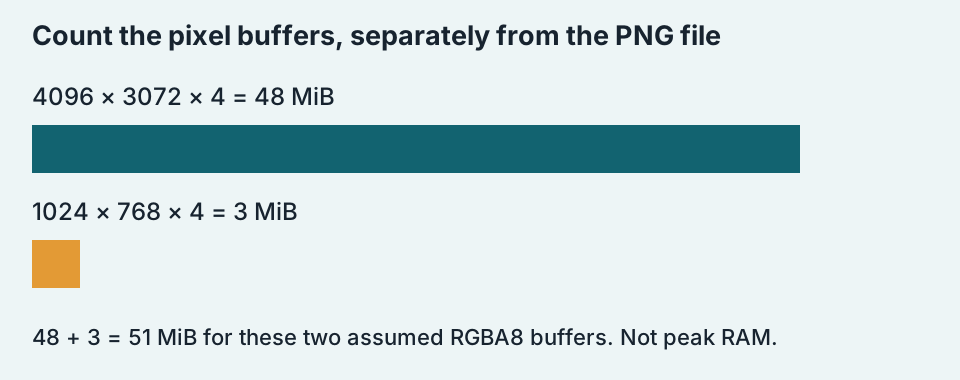
Our local check measures a Python byte string after PNG decoding. It does not sample Chrome’s memory, allocate a large canvas on your phone or identify a safe maximum image size. A browser can use different backing storage, temporary surfaces and decoder strategies. A failure may also involve implementation limits or other resources. None of those causes can be diagnosed from the compressed file’s byte count alone.
Calculate only the buffers you name
Enter source and target dimensions below. The result adds one RGBA8 source array and one RGBA8 target array. It performs arithmetic only: no file is uploaded, no image is decoded and no canvas of those dimensions is created. The input range is a calculator validation rule, not a statement about supported browser sizes.
Choose dimensions, then calculate.
The formula is source bytes = source width × source height × 4; target bytes = target width × target height × 4; named total = source bytes + target bytes. Every MiB result divides bytes by 1,048,576. Extra retained buffers are excluded unless you calculate and add them separately. The calculator intentionally gives no green “safe” verdict.
Will lowering JPEG quality fix a memory problem?
It can change encoded file size while leaving width and height unchanged. Under the same RGBA8 assumption, the calculated decoded payload stays unchanged too. If you are diagnosing a real failure, record the dimensions and exact error before choosing a remedy; this page has not measured your device.
Should I always choose the smallest possible dimensions?
Choose dimensions that serve the final use. Reducing them lowers the calculated pixel payload, but can remove detail you need. Keep your original and make a separate export so that a later requirement can use the original pixels.
Write down file bytes and pixel-buffer bytes as separate quantities. One describes the package you download; the other describes the particular decoded representation you chose to count.
Browse more image resizing diagnostics →