IMAGE RESIZER / ORIENTATION DIAGNOSTIC
Why did my image width and height swap?
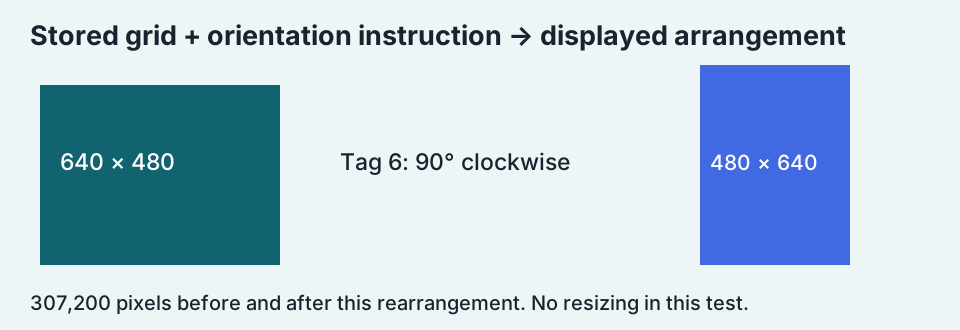
A photo can store a landscape pixel grid and carry an EXIF instruction to display it rotated. Applying a quarter-turn changes a 640 × 480 arrangement into 480 × 640. That swap alone does not prove the image resizer cropped or stretched your photo. Compare the stored grid, orientation tag and final displayed result before rotating it again.
Compare the downloadable orientation test ↓Stored dimensions and displayed orientation can disagree
Some tools report the dimensions encoded in the image, while others report dimensions after applying orientation metadata. A quarter-turn exchanges the axes. This article tests one specific EXIF value, orientation 6, rather than claiming that every swapped image has the same cause or that every application handles metadata identically.
One chart, two JPEG tags
We built a 640 × 480 chart with four colored corners and a top-left label. We saved two JPEGs with identical quality and color-sampling settings. One carried EXIF orientation 1; the other carried orientation 6. Reading the encoded grids without applying the tag gave 640 × 480 for both. Their decoded RGB arrays had identical hashes. The tag changed the display instruction, not the raw JPEG picture in this controlled pair.
Apply the rotation, then remove the instruction
We applied orientation 6 to the tagged JPEG and exported the resulting pixels as PNG without an orientation tag. That normalized output measured 480 × 640. Every output pixel matched the expected quarter-turn mapping. The PNG was used to retain the decoded test pixels exactly; it is not evidence that repeatedly saving JPEG is lossless.
| Test file | Stored pixels | EXIF orientation | Exact file |
|---|---|---|---|
| orientation-1.jpg | 640 × 480 | 1 | Download |
| orientation-6.jpg | 640 × 480 | 6 | Download |
| normalized.png | 480 × 640 | Absent | Download |
| tag-removed-only.png | 640 × 480 | Absent | Download |




We also made a deliberately incomplete version: remove the tag but keep the original grid unchanged. It remained 640 × 480, with exactly the original decoded pixel order. This version loses the instruction needed to produce the rotated arrangement. It illustrates why deleting metadata alone and normalizing orientation are different operations; it is not a recommendation to strip a real photo’s tag blindly.


Verify the swap without guessing
The input contains 640 × 480 = 307,200 pixels. The normalized result contains 480 × 640 = 307,200. For source coordinates measured from zero, our clockwise mapping is (x, y) → (479 − y, x). The source top-left pixel therefore lands at output coordinate (479, 0), the top-right corner of the new grid. We checked all 307,200 output coordinates against that rule, rather than judging only the preview.
Equal pixel counts alone do not prove this mapping was followed: unrelated edits could preserve the same count. The coordinate comparison is the stronger check in this experiment. It establishes an exact rearrangement of the decoded test image, with no interpolation, resizing or crop in the normalization step.
A useful record before your next export
For this fixture the diagnostic record is: stored size 640 × 480, orientation 6, normalized size 480 × 640, final orientation tag absent. If another export from this fixture already has the normalized arrangement, applying the same quarter-turn again changes it a second time. Inspect the final file before repeating a rotate command. The record describes our reproducible test, not a guarantee that your editing application follows the same export policy.
Should I rotate it manually?
First check whether the image is already displayed upright and whether the export has applied orientation. If the app honors the tag, another manual turn can make it wrong. If a receiving system ignores the tag, a correctly normalized export may be more predictable. Keep the original so you can compare both the visual orientation and dimensions.
Does an orientation swap explain every resize mismatch?
No. Crop settings, presets and other transformations can change width or height too. This test isolates orientation 6. It does not diagnose all EXIF values, every phone or a particular online resizer. If the dimensions are not a simple axis exchange, inspect the actual resize and crop settings separately.
Record the grid and the instruction together. A width-height pair without its orientation context can describe the wrong stage of the image pipeline.
More image resizing guides →